
- GNU Linux
- Software
- Maintenance
- Security
- Utility items
- Privacy policy

Kudu, the OpenSource utility to breathe better
The utility for cleaning and monitoring the system Kudu Published by the software development studio Advent Development, it has established itself as a modern and transparent alternative to traditional maintenance applications (such as CCleaner) that have repeatedly lost the trust of users due to aggressive advertising practices, invasive telemetry, or preinstalled third-party software (bloatware), or simply due to the functional limitations on their free versions.
The philosophy and development path of Kudu are very different.
For GNU Linux, not just macOS and Windows
First of all, unlike other disk cleaning, optimization, and computer integrity monitoring tools, Kudu was not originally developed for Windows and macOS, but rather for GNU Linux. This is immediately apparent upon installation: the quality is uniformly excellent, regardless of the operating system on which it is installed.
Genesis and philosophy of the project
For years, the market for computer cleaning utilities has been dominated by proprietary solutions that are either paid or loaded with advertising banners. Faced with this situation, Kudu was designed with a strict guideline: zero advertising, zero third-party software and total transparency.
The project has chosen to turn to open source under a license. MIT, This allows any security audit user or developer to check the source code line by line on GitHub and ensure that no personal data is leaked without the user’s knowledge.
An approach focused on multi-platformity and modernity
Unlike many legacy maintenance applications confined to Windows, Kudu was developed from the outset to meet the needs of heterogeneous modern environments. It is aimed at both users of Linux, macOS and Windows.
Technically, the application relies primarily on web technologies (with a large portion of TypeScript for its structure) while deeply interacting with the underlying systems.
Functional evolution
Through its successive versions, Kudu has been structured around specific pillars to become a complete maintenance suite:
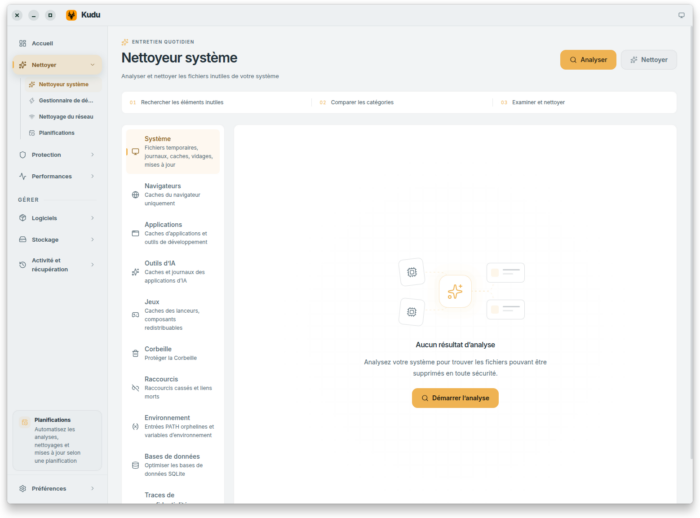
- Transparent cleaning (System Cleaner) : Unlike software black boxes, Kudu systematically displays each file before deleting it, relying on cleaning rules based on JSON files that are readable by everyone. It also integrates a cleaning receipt system (Cleanup Receipts) ;
- Security and tightening (Security hardening) : The tool integrates configurations to lock down privacy (management of OS telemetry settings, malware search tools based on YARA rules, and persistent points analysis);
- Managing software and updates: Kudu has integrated bridges with the native package managers of each platform (
winget,Homebrew,apt,DNF,pacman) to automate and mass-produce software updates; - Advanced features and game mode: The gradual addition of real-time performance monitors, game optimization modes (Game Mode) and disk space analysis tools (Storage History) has expanded its audience well beyond the mere computer technicians.
Its economic model and the openness of developers towards the cloud
Although the core of the desktop application remains entirely free and open source, the project has introduced an economic model based on complementary services, notably: Kudu Cloud. This paid extension allows users to monitor the health of multiple machines remotely (ideal for maintaining the computers in a family or IT park) and receive alerts in case of failure (full disk, antivirus disabled, etc.) directly from a web browser.
Today, Kudu is hailed by the specialized press (and by us, ndrl) as one of the most reliable and privacy-friendly maintenance solutions, supported by an active community on GitHub that contributes to translations (over 30 languages) and the enrichment of cleaning scripts.
And then, Kudu, he's beautiful!
In the OpenSource world, a common practice is to say that aesthetics aren’t that important since, in the end, it’s the features that matter, often the free-of-charge nature, and always respect for privacy.
However, the well-crafted aesthetics of Kudu, including under GNU Linux, makes it a pleasant tool to use, as one would hope to see even more of it in the free world (again).7

But… and what about BleachBit on GNU Linux?
In fact, Kudu does not replace an application like BleachBit (or its brother, the BleachBit Root administrator) by default.
This is about two separate cleaning software :
Different approaches and roles
- BleachBit / BleachBit (Root) is the tool for secure cleaning and destruction of data (privacy/deletion) historical world of GNU Linux. It mainly aims at deleting caches, cookies, system logs and file shredding. Its entry «Root» is used to run the software with administrator privileges to clean up elements reserved for the system (unused APT packages, system logs
/var/log, global caches); - Kudu is also an OpenSource utility, but multiplatform, as mentioned above, and especially oriented towards «global maintenance» in the sense that in addition to deep cleaning of temporary files, it offers an overview of the system (analysis of disk space, management of applications at startup, monitoring of processes and diagnostics, and for Windows, updating drivers and applications; this is done by, for example, CCleaner in its paid version — while with Kudu, it’s free).
Operation under GNU Linux
- No native integration by default: Some GNU Linux distributions such as Zorin OS 18 include their own built-in maintenance settings (with Zorin OS, in Settings -> Privacy -> File History and Trash to automatically purge temporary files);
- That said, a notable gain: Kudu proved more effective than the built-in utilities in Zorin OS for gaining space;
- As an alternative solution: If you install Kudu, you can use it as an alternative to BleachBit for common deep cleaning tasks of the user profile.
However, Kudu does not replace the binary structure of BleachBit nor its separate Root icon/mode (which should be used with caution, nor without first carefully reviewing the proposed actions if one wants to avoid the deletion of data that one thought was— perhaps wrongly — safely).
Performance analysis
The part Performance analysis It focuses primarily on the diagnosis of resources, the inspection of processes, and the monitoring of the execution flows of an application or container.
Real-time resource monitoring
- CPU and Memory Consumption: Kudu provides a detailed view of processor and memory usage, allowing you to quickly identify memory-hungry processes or memory leaks (memory leaks) ;
- Disk space and I/O: It allows you to analyze the usage of mounted partitions, inspect the space occupied by the application's files, and track the activity of input/output operations (read/write operations on storage media).
Management and inspection of processes (Process Explorer)
- Similar to a lightweight task manager, the Kudu process explorer on Linux allows for
- List all active processes related to the execution environment;
- Visualize the hierarchical tree of processes (PID, parent/child processes);
- Consult the files or network ports opened by a specific process to identify conflicts or blockages (deadlocks).
- List all active processes related to the execution environment;
Journal analysis and diagnostics (Log Streaming)
- For hot performance troubleshooting, Kudu allows
- Consult and follow live (Streaming) the flow of newspapers (logssystem or applications (errors, warnings, HTTP requests);
- Recover diagnostic snapshots (dumps) in case of a crash or critical slowdown for a later in-depth analysis.
- Consult and follow live (Streaming) the flow of newspapers (logssystem or applications (errors, warnings, HTTP requests);
Execution environment and variables
- With its Kudu service manager, it provides direct access to the environment configuration (environment variables, versions of the installed runtimes, access paths), which helps to understand whether a performance problem stems from a bad system configuration or an inappropriate cache setting.

In short, we found it brilliant and we adopted it!
And you? Your opinions and experiences with Kudu are of interest to us! Tell us in the comments what you think about it 🤖
Editor’s website: https://usekudu.com/
Related posts

Commodore 70 years on

Apple and the Appearance of Supermen

An experience of privacy according to the gospels of the Linux, Microsoft and Apple worlds

 Français
 English
 Español de República Dominicana
 Kiswahili